ScanIt Parts Academy
Processing Returns
Returns Track
Why Track Returns?
Every parts department deals with returns -- parts that come back from service, body shop, customers, or wholesale accounts. Without a system, returned parts can end up mixed in with regular stock, damaged parts get resold, and nobody knows who returned what.
ScanIt Parts Returns tracking solves these problems by recording who returned every part, tracking where the return came from, categorizing why it was returned, updating your DMS in real-time, and keeping damaged parts separate from sellable stock.
The Scanner Returns Screen
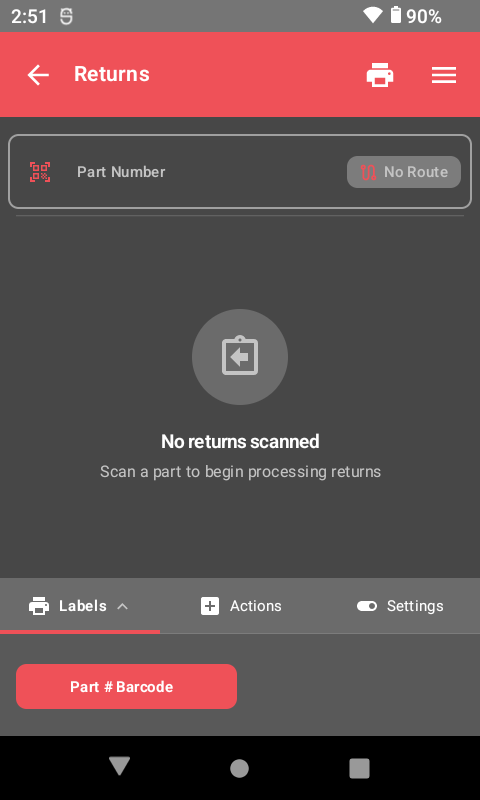
When you select Returns from the scanner main menu, you see the returns screen where you scan parts and select return reasons. The interface guides you through each step of the return process.
Basic Return Workflow
- Select Returns from the scanner main menu.
- Scan the part barcode on the returned part.
- The system displays part information (number, description, bin location).
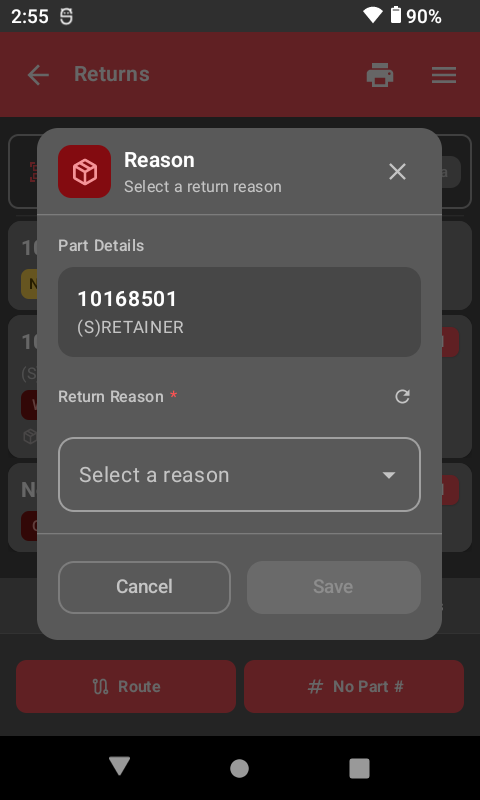
- Select the return reason from your category list (Damaged, Core, Warranty, etc.).
- Select or enter who is returning the part.
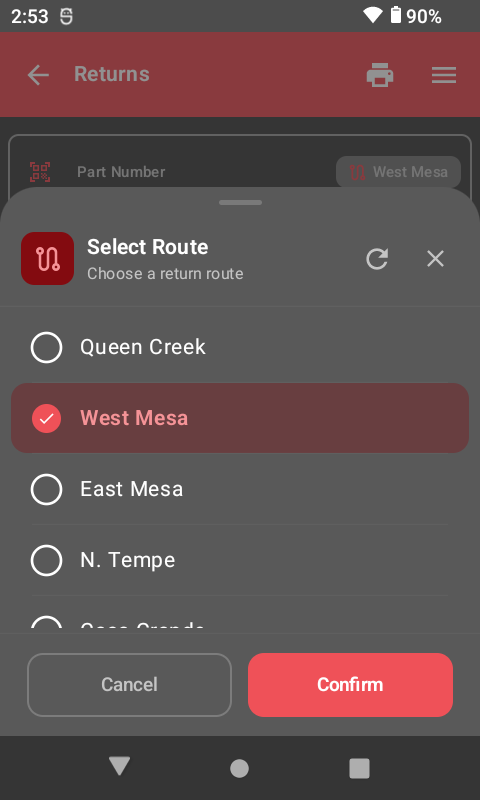
- Select where the return came from (service, body shop, customer, etc.).
- Confirm the return -- the system updates your DMS automatically.
Always select the correct return category. Damaged parts marked as "good stock" will end up back on the shelf and could be sold to another customer.
Return Categories
Your dealership can set up custom return categories. Here are the most common ones:
Damaged
When a part is physically damaged:
- Scan the part and select Damaged as the return reason.
- The part is flagged and kept out of sellable inventory.
- Damaged parts go to a designated return area, not back to the bin.
- Process vendor return credit as applicable.
Core
Core returns are common for parts like alternators, starters, brake calipers, and other remanufactured items:
- Scan the part and select Core as the return reason.
- The core is tracked for vendor return.
- Core credits are processed through your DMS.
Process core returns promptly. Most vendors have time limits on core return credits.
Warranty
For parts that failed under warranty:
- Scan the part and select Warranty as the return reason.
- Record the original invoice or RO number if available.
- The system tracks the warranty return for claims processing.
- Keep the defective part until the warranty claim is resolved.
Other Categories
Additional common categories include:
- Wrong Part -- incorrect part was pulled for the job.
- Not Needed -- part was not needed after all.
- Defective -- part does not work properly.
Your dealership can create additional custom categories (Vendor Recall, Overstock Return, Cross-Ship) through the ScanIt Parts web dashboard.
Recording Return Sources
The return source tells you where the part came from:
- Service Department -- parts returned from service repair orders.
- Body Shop -- parts returned from collision repair.
- Customer -- retail or wholesale customer returns.
- Wholesale -- returns from wholesale/jobber accounts.
- Internal -- parts moved internally (wrong part pulled, etc.).
Returns Metrics and Reporting
The system tracks every return and feeds that data into reports so you can spot patterns and take action. Returns reporting helps you understand what is coming back, why, and whether specific parts or suppliers are causing recurring problems.
Available metrics include:
- Return Volume -- total number of returns over a given period.
- Trends by Category -- breakdown of returns by reason (Damaged, Core, Warranty, etc.).
- Return Rate -- percentage of parts sold that are returned.
- By Part Number -- which specific parts are returned most often.
- By Supplier -- which vendors have the highest return rates.
Review returns reports monthly to identify recurring issues. A high return rate on a specific part number may indicate a quality problem with the vendor or an incorrect application listing.
Using Returns Data
- Identify problem parts -- parts with high return rates may need to be sourced from a different vendor.
- Track supplier quality -- compare return rates across vendors to hold them accountable.
- Reduce waste -- spot trends early before they become costly patterns.
- Improve training -- high "Wrong Part" returns may indicate a need for better part identification training.
Quick Reference
- Process a Return: Returns → Scan Part → Select Reason → Enter Who/Where → Confirm
Key Rules
- Always scan the part -- do not just put it back on the shelf.
- Always select the correct return reason.
- Always record who returned it.
- Never put damaged parts back in sellable inventory.
- Process core returns promptly for vendor credit.
Related Resources
Take Control of Your Returns Process
See how ScanIt Parts returns tracking creates complete accountability and protects your inventory.
Request a Demo